SHOW ME

Thursday, November 16, 2006

Five Languages In Which I Cannot Think

Antananarivo, Madagascar (Wikipedia)

I'm hoping to find individuals fluent in any of the languages below to help me translate a small amount of dialogue (under a page of each) from English for a novel-in-progress. These languages include:
  • French
  • German
  • Malagasy
  • Swahili (preferably the dominant dialect of Afmaxaatiri)
  • Italian (cleaning up my own Italian translation)
If you are able and interested in contributing, please contact me at pensare.nelle.immagini (at) gmail.com.

Thinking In Words

One of my original goals with Think In Pictures was to offer medium-form commentary on things I saw around me, but all I've been posting for the past few weeks is link-outs. I'm at a point now where it's worthwhile to tell readers why.

I have been working steadily on a young-adult novel for the past year, a project I began before my now two-year-old daughter was born. Since I began blogging in June, first here and later with my other blog, Z Recommends, I have worked long hours to juggle the two interests, and am at a point now where I can reach my goal of a solid second draft of my novel (the draft I will send out to publishers for review) before the end of the calendar year. To accomplish this, I have had to temporarily reduce the depth of my blogging a bit.

That doesn't mean activity here will fade much; it just means you can expect more quick links and images than essays or analysis for the next couple of months. To minimize this deficit I will also begin posting intermittently about things that stand at the intersection of "thinking in pictures" and my novel-writing project - interesting images and visual resources I come across in my book research, images documenting my writing process - as well as offering a few file downloads which I'll discuss later, including an Excel-based visualization I created as a writing aid. I will try to do all of it without talking too much.

In the meantime, thanks for your readership. I promise that after New Year's we will get back to our regularly scheduled blogging, and with a few surprises in the spring. Keep those comments coming, and send any content tips to pensare.nelle.immagini (at) gmail.com (sorry, "tiptip" was taken).

Wednesday, November 15, 2006

Life Expectancy Watch

A time monitoring apparatus for monitoring and displaying an approximate time remaining in a lifespan of an individual, said monitoring apparatus programmed to decrement time units from an actuarially determined lifespan and to shift a projected lifespan value as the individual grows older. [Via|Link]

A Pertinent Question

Tips For Advertising In Second Life


Prokofy Neva's Second Thoughts blog has a great list of tips for companies hoping to earn real customer dollars by advertising in Second Life. Most of them deal with issues of preserving the integrity of the online world and designing spaces for actual use, not showpiece value; the showpieces all end up looking like futuristic Indian burial grounds. Above, a Second Thoughts screenshot of one of the many logo-branded avatars attempting to make inroads in Second Life. [Link]

Fun With Walt and Karl: Disney Cartoons Remixed To Illustrate The Communist Manifesto

Tuesday, November 14, 2006

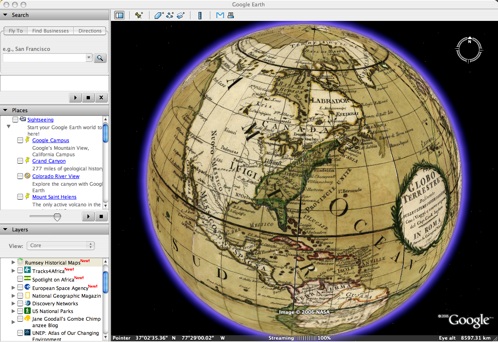
Google Earth Meets History

Google has added historical maps to Google Earth, including the above world map from 1790, a map based on information gathered from the Lewis and Clark expedition (published in 1814), an 1853 map of San Francisco, and more.

[Via|via|Link]

Ask Your Pocketbook

Do Your Bit

Monday, November 13, 2006

Seven Visual Timers (With .PPT Download)

Inspired a while ago by a post about timing events in the classroom at the wonderful ed/tech blog teaching.mrbelshaw.co.uk, I took on the challenge of representing the passage of segments of time in PowerPoint visually. I decided to make visualizations I thought would be convenient for educators - the intervals are two minutes, five minutes, then ten, fifteen, twenty, thirty, and forty-five minutes. Sadly, the file is not Mac-friendly - most of the animations use motion paths, which the truly spartan Mac version of PowerPoint cannot handle. I gave up on designing in PowerPoint for Macs long ago, and there really are no strong alternative presentation design programs when it comes to basic animation.

You can download the PowerPoint yourself from my Google Base account, or see a couple of highly sped-up samples thanks to YouTube:


Download the PowerPoint here.